
Template designer
Build a branded HubSpot quote template, no code, no developer
A quote is the last thing a prospect sees before they sign. Designing one shouldn’t need a developer or a template project that takes a quarter. Build the layout visually, drop in the components you reuse, and publish.
The short answer
What is a no-code quote template designer?
It’s a visual builder for the documents your quotes render as (branding, layout, line-item presentation, terms) with no code and no developer. In Quotivity you design the template, drop in reusable modules for the parts every quote needs, preview it against a live quote’s real data, and publish it for reps to use in HubSpot.
What you can do without a developer
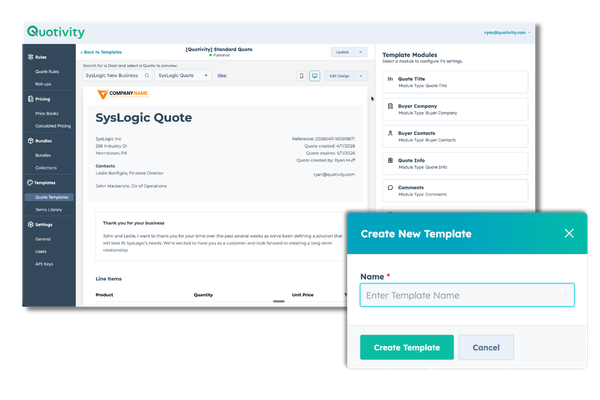
Start from a template in one click
Generate a ready-made template instead of staring at a blank page, so a new template is minutes of work rather than a project. It’s the starting point every other change builds on.
Design it visually, no code
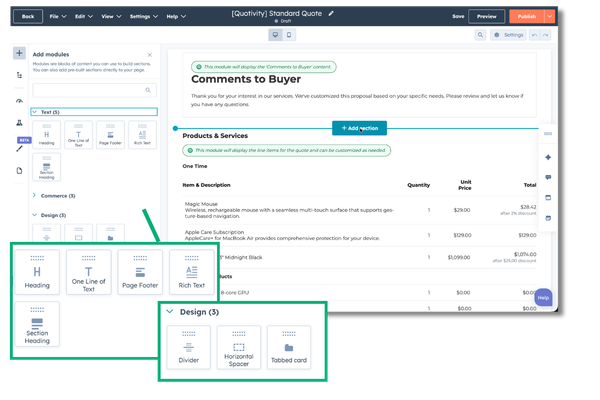
Build the layout in HubSpot’s visual editor, adding sections and moving content around without touching HubL or waiting on a developer. Change the colors, logo, text, and structure whenever your process does. When a rate negotiation turns into a revised quote, you update the template in seconds instead of rebuilding it, and every quote still goes out on-brand.
Preview against real data
The part that settles arguments is the preview. You see the template against a real deal’s line items, discounts, and totals before the customer does, not a placeholder, and the pricing logic runs behind it, so what you preview is what sends.
The builder and the parts
One page used to be two, and the split confused everyone. Here’s the whole thing in one place.
The designer is where you build and brand the template: the visual editor, one-click generation to start from, and a live preview that shows the template against a real quote’s data instead of a placeholder.
The modules are the reusable components you drop into a template, included with every license:
- Terms-of-use checkbox for a recorded “I agree” on contracts and agreements.
- Embedded video, Google Docs, Slides, or Sheets to bring a demo, an SOW, a pitch deck, or a live pricing breakdown into the quote itself.
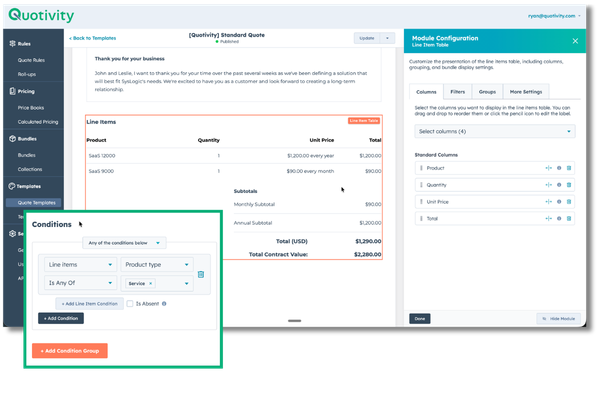
- Group-by-products view to organize line items into sections like Products, Services, Labor, or Software.
- Property visibility to show or hide fields, so a customer sees what’s relevant and nothing that overwhelms.
- Conditional rich text that changes with the customer, for personalised terms or summaries.
- File attachments to include an MSA or scope of work and collect signatures on all of it in one place.
- Optional line items so a customer can add services or products themselves, then sign.
- Payment collection through Stripe or Commerce Hub, so a signed quote can be a paid one.
Designer builds the layout. Modules are the library. You’re not choosing between two products, you’re using both.
How it works
1. Create a template. Start from scratch or generate one instantly.
2. Design in HubSpot. Lay out the structure in the visual editor.
3. Configure in Quotivity. Set the content, logic, and module behavior.
4. Preview and publish. Give it a final look, publish, and start sending.
Quotivity handles the rendering, data injection, and formatting behind the scenes, so templates stay reliable. It was built from a line of customer feedback we heard more than once: “creating quote templates is way too hard.”
You might not need this
If HubSpot’s standard quote layout already looks the way you want and every quote uses it as-is, you don’t need a designer. This is for teams whose quotes carry branding, custom sections, or components that change by deal, the ones currently rebuilt or worked around because the standard template can’t hold them.
It does
- ✓ Build branded quote templates visually, without code
- ✓ Preview against real quote data
- ✓ Provide reusable modules for the components quotes need
- ✓ Publish for reps to use in HubSpot
It doesn’t
- ✗ Design the brand for you. It gives you the canvas and the components; the look is yours. Templates are built in Quotivity Studio and render on your HubSpot quotes.
Questions about the template designer
-
Can I build branded HubSpot quote templates without code?
Yes. The designer is drag-and-drop and visual. You brand the layout, add modules, preview with real data, and publish. No developer, no template project.
-
What are quote modules?
Reusable components you add to a template: terms-of-use checkboxes, embedded media, grouped product views, conditional text, file attachments, optional line items, payment collection. They’re the parts you reuse across templates.
-
What’s the difference between the template designer and quote modules?
The designer is the builder. It’s where the template is assembled and branded. Modules are the component library the designer draws from. One is the tool, the other is the parts.
-
Can I preview a template before reps use it?
Yes, against a live quote’s real data, so you see the actual line items and pricing rather than a placeholder before you publish.
-
Where are templates managed?
In Quotivity Studio. They render on the HubSpot quotes your reps send.
One thing to try
Pull the quote template you’ve been meaning to fix
The one with the workaround baked in. Rebuild it here in an afternoon, no ticket to engineering.