

For sales ops
Clean quote data in HubSpot, without the reminders
The spec is blank because someone had to remember it. Quotivity decides which attributes appear on which line item, marks the ones that matter required, and writes the values back to HubSpot. Nobody has to remember anything.
One portal held 30,000 SKUs. About 1,200 had ever sold.


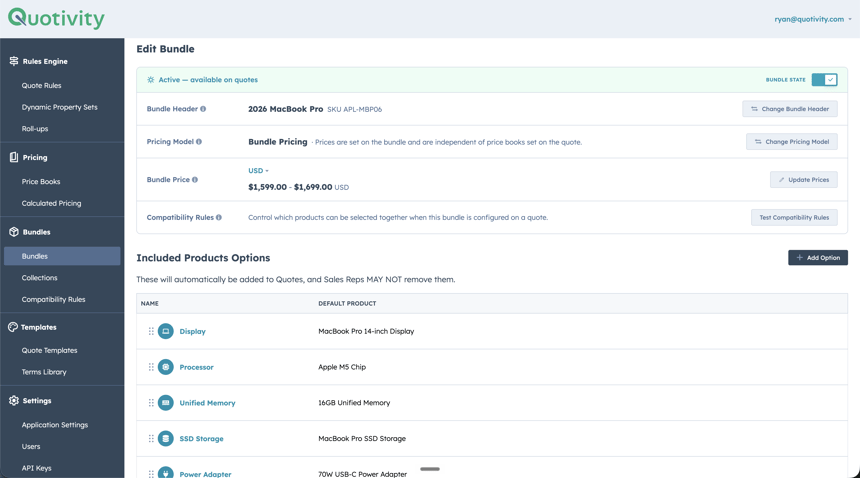
Quotivity Studio: rules, dynamic property sets and pricing in one admin surface. Reps never open it. They just see fewer fields, and the ones they see apply to what they’re quoting.
About 1,200 had ever sold
Reduction seen in a HubSpot portal (Keith Mead)
Organized by Watershape, no factory
The short answer
How do you capture product attributes on a HubSpot quote?
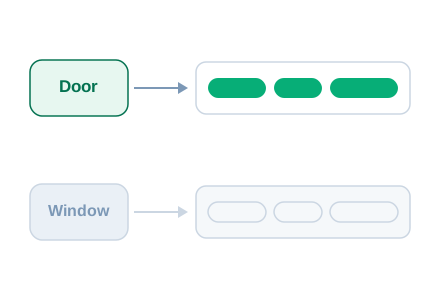
A property added to HubSpot’s quote builder shows on every line item, so a rep quoting one sliding window looks at a fire-rating field meant for doors. Quotivity scopes attributes with rules. A rule matches products by the HubSpot properties they already carry and surfaces only the fields those products need. Values write back to the line item.
A rule surfaces the right fields on the right product — and on nothing else.
When 30,000 SKUs are really an attribute table
Some teams never hit the column problem, because they solved it with SKUs instead. Every permutation becomes its own product record. One portal owner described a catalog of 30,000 SKUs. Two years of order history showed about 1,200 of them had ever actually been sold.
Sales Reps don’t know which of the 19 Products with identical SKUs they need to pick to get the right year’s price, bulk rate, etc, and so there’s endless wrangling with Ops/Finance about it all.
Keith Mead
He’s publicly written that he’s seen Quotivity cut the number of products in a HubSpot portal by 10x. It isn’t only a manufacturing problem. Watershape has no factory anywhere. It’s a design and engineering practice, and it organizes about 2,000 SKUs of professional services.
The rules engine behind clean quote data
Four things you manage once, in Studio, that reps never have to think about. Follow any of them.
Rules
Rules Engine
Scope which attributes appear per product class. Required where it matters, optional where it doesn’t.
Compatibility
Compatibility Rules
Exclude invalid options by attribute, not by a hand-maintained list of pairs.
Configure
Configurable Products
One configurable product instead of a record for every permutation.
Pricing
Price Books
Segment pricing from one catalog. No duplicate products per price list.

Required where it matters
Required product attributes, enforced per line item
A rule targets products by their HubSpot properties. Product Type = Door surfaces fire rating, handing and frame type on every door in the catalog, and on nothing else. Required fields block submission until they’re filled. Defaults you’ve already set on HubSpot line item properties come through pre-filled, so the rep is confirming a value rather than typing one.
You might not need this
If you quote a dozen products and they all want the same three fields, add three columns and stop reading. Attribute rules earn their money where the fields change with the product.
What customers say
Renée Durrance runs revenue operations at Aptarro, where clean quote data cut the negotiation cycle from 29 days to 6.
Sales reps are incentivized to stick to price book because they can get their deal out the door much faster.
Renée Durrance — RevOps, Aptarro
One more, from a buyer who’d come from Salesforce:
it blew my mind that I didn’t have a way to make certain products unquotable for reps in HubSpot
Sam Hodgson
Questions the portal owner asks about sales ops CPQ
-
Can we use the HubSpot properties we already have?
Yes. Conditions are written against existing HubSpot product properties. You don’t create a parallel set of Quotivity fields.
-
What happens when two rules match the same product?
Their property sets merge. If either rule flags a property required, it’s required.
-
Where do we manage the rules?
The Configurations screen in Quotivity Studio, under the Rules Engine group. Admin-managed, no code, no developer.
-
Does this change what reps see?
Yes. They see fewer fields, and the ones they see apply to what they’re quoting. Required fields block submission until they’re filled.
-
How does it handle bundles?
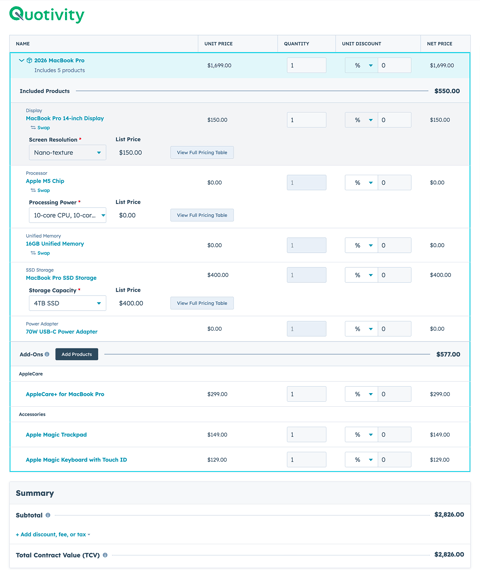
Bundle components are line items like any other. Each one matches rules on its own properties, so a bundle header and its components can pick up different attribute sets.
-
Can a field be required on some products and optional on others?
Yes. Required is set per rule, so a field can be mandatory on the products that rule matches and absent everywhere else.
One thing to try
Open your last twenty quotes
Tell us which field is blank on half of them. That’s the rule we’d write first.