Quote documents

Can HubSpot produce the quote document we need?

Basic customization, yes. Detailed styling or a proposal-style document, no. Those are two separate limits and this page keeps them apart, because the first one stops far fewer teams than the second.

Branded quotes, yes · Detailed styling, no · Proposal documents, no

What native HubSpot does

More than people expect. Quote templates carry your branding, logo and colors; modules can be arranged, shown, hidden, and locked so reps cannot break the layout; you choose which line item columns appear; and terms, signature blocks, e-sign and payment all sit on the document. For a clean, consistent, branded quote that is enough, and it is good.

Limit one: detailed styling

You get the template's layout with your brand applied. You do not get control over typography, spacing, section styling, or anything else that makes a document look designed rather than filled in. Teams with a real brand standard usually hit this before they hit anything structural.

Limit two: proposal-style documents

Cover pages, narrative sections, scope-of-work write-ups, case studies, appendices, conditional multi-page structure — none of that is what a HubSpot quote template is for.

Both limits have the same structural cause: a HubSpot quote template has a single drag-and-drop area. No sidebars, no complex page layouts. Past that you are into custom modules, which are constrained by the same single-area layout and are code you own.

What it looks like in Quotivity

A template designer with conditional terms, so the document changes with the deal rather than being edited by hand after the fact. Sections appear or disappear on the conditions you set, and the terms that apply to this customer are the terms that print.

Worth saying plainly: if your quote is a price sheet, none of this is a reason to buy anything.
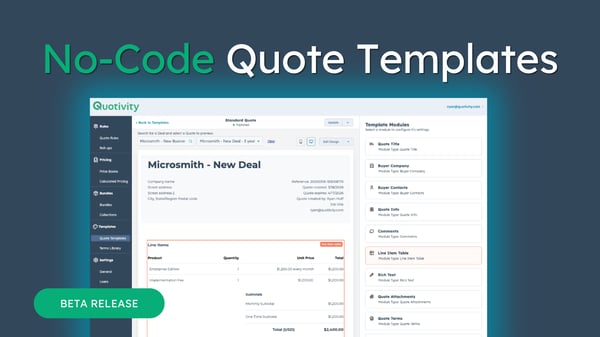
Templates 2


What you have in Salesforce CPQ Where it lands in Quotivity What to expect
Quote templates
Template designer
Rebuilt, not imported. There is no template migration path on any platform.
Template content and sections
Document sections
Structure carries over; the layout is reassembled by hand.
Quote terms
Conditional terms
Terms that vary by deal stay conditional rather than becoming manual edits.

The document question is usually three questions

A price sheet, a branded quote, and a proposal-style document are not the same thing, and the answer changes completely depending on which one you actually send.

  • A price sheet or a clean branded quote. Native is enough. Configure it and stop there.
  • A designed document. Detailed styling is where the limits show up, and they show up early.
  • A proposal. You are solving a document problem that is broader than quoting, and the quote template is the wrong place to solve it.

Ask which of the three you send before you price anything. Plenty of Salesforce CPQ shops produce proposal-style output from heavily customized templates and assume that is what a quote is.

One thing worth knowing before anyone quotes you for it: quote templates get rebuilt rather than imported on every path, including Revenue Cloud Advanced. It is not a cost of leaving Salesforce. It is a cost of changing quoting systems at all.

Quote documents

Are you rebuilding one document, or eleven?

The analysis counts your templates, sections, line columns and terms — including the ones nobody has used in two years. That number is usually smaller than people fear, and it is the one that sizes the work.

Sending proposals rather than quotes? Book a scoping call and we will tell you whether we are the right answer.

