

HubSpot contracts

HubSpot contracts, created by the Quotivity quote that sold them

Your HubSpot contract is decided at the quote. Change quotes then open from it with your bundles intact.

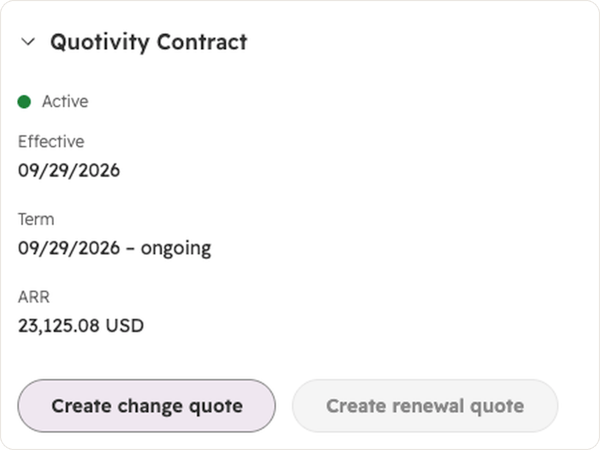
A HubSpot contract record with Quotivity’s card open, showing buttons to create a change quote or a renewal quote.
The short answer

What is HubSpot Contracts Support in Quotivity?

HubSpot Contracts Support creates a HubSpot contract when a Quotivity quote is accepted. A HubSpot contract is HubSpot’s record of what a customer has committed to: the one-time and recurring products, the revenue they represent, and every change over time. Quotivity writes that contract to HubSpot’s own contract object, so it’s a native record in your portal. From it, reps start change quotes for mid-term changes and renewal quotes for the next term, each pre-filled from the contract. Quotivity is CPQ (configure, price, quote) for HubSpot, so the bundles and calculated prices on your quotes are what the contract receives.

people

Partway through the term, the customer adds two lines

Here’s an illustrative case. Take a packaging-equipment maker and call them Halvorsen. Every case packer they sell comes with an annual remote monitoring subscription per line, plus a one-time commissioning fee.

A regional bottler buys one line. Later in the term, the bottler brings two more online and wants monitoring on all three.

The rep goes looking for what the bottler already owns. The original terms sit on an accepted quote attached to a different deal. He works out the proration in a spreadsheet. Finance works it out differently, and the invoice doesn’t match the quote.

When renewal comes around, someone rebuilds the contract from two deals and two quotes. The draft that almost goes out covers one line.

Three things you stop rebuilding by hand

The contract, at acceptance

The moment a Quotivity quote is accepted, the HubSpot contract exists. If creation ever fails, acceptance still goes through and a task lands on the deal, so a signed quote is never held up.

Changes that start from what they own

A change quote opens pre-filled from the contract, bundles and all, at the contract’s prices and discounts. The rep edits the lines that changed and sends it.

Renewals at the real quantity

Renewal quotes carry recurring items in their end-of-term state. A contract that started at 10 licenses and added 10 renews at 20, whoever builds the quote.
Created the moment the quote is accepted

Quotivity creates the contract however the quote gets accepted: e-signature, written signature or Mark as Accepted. It’s on by default. The contract carries the recurring and one-time line items, currency, deal, billing contact, company and owner. Its effective date is the quote’s contract start date if you set one, and the acceptance date if you didn’t.

A “Contract created” event shows up on the deal timeline. If a contract is already linked to the quote, Quotivity won’t make a second one. And if creation fails, acceptance goes through anyway and Quotivity creates a HubSpot task on the deal so someone picks it up.

For customers you already have, Quotivity can create contracts from quotes they accepted before you turned this on. That’s on request through our CX team.

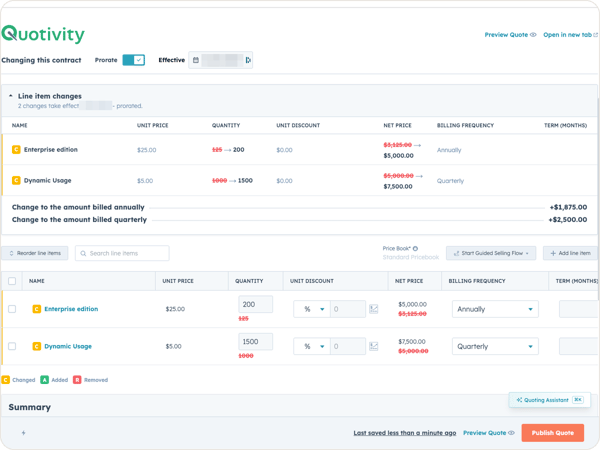
Quotivity’s change quote builder on a HubSpot contract, with two quantity changes shown inline, the old values struck through, and the resulting change to the amounts billed annually and quarterly.

Change quotes that open with what the customer owns

On the contract record, the Quotivity card has a Create change quote button. The rep picks an effective date, today or later, and whether to prorate. Quotivity opens a quote pre-filled with everything active on the contract, including your bundle structure, at the contract’s prices and discounts.

From there the rep adds, updates or removes lines, or extends or shortens the term. Each change shows inline with the old value struck through. One-time items stay visible but locked, same as HubSpot. The prorated adjustment appears as a labeled estimate, and HubSpot’s numbers after acceptance are the ones that stand. On Quotivity quote templates, the buyer sees the changes too.

One thing to expect: calculated pricing re-prices contract lines while the rep edits, so a price can move on a line nobody touched. That’s intended. The change quote uses today’s pricing rules.

At acceptance, Quotivity checks that the contract hasn’t changed since the quote was built, then applies everything in one step. If it has changed, the rep sees a conflict, refreshes and resends.

Renewals built from the end of the term

A rep can create a renewal quote from the contract card, or a HubSpot workflow can do it on schedule with Quotivity’s Create Renewal Quote action. Either way, Quotivity creates a new deal in the renewal pipeline and stage you chose, with a quote holding the contract’s recurring items in their end-of-term state, at contract prices and discounts. Everything added by change quotes comes along.

Bundles flatten at renewal. The recurring products inside a bundle carry over as individual lines, and the bundle wrapper doesn’t. If your bundles mix recurring and one-time items, walk one renewal through with us before you rely on it.

Reps can add products to the renewal and co-term them. When the renewal is accepted, Quotivity creates the new contract starting on the old one’s end date, linked to it as the renewal.

Your admin finishes setup on one screen

CX turns Contracts Support on for your account and walks your admin through the rest. On the Contracts screen in Quotivity’s settings, your admin re-authenticates the app to grant contract permissions, then picks the renewal pipeline and stage. Contract creation is already on.

We recommend one pipeline each for new business, expansion and renewal, so HubSpot’s revenue reports can sort bookings cleanly. Quote Rules can also target quote type, which means an approval can apply to change quotes specifically.

Changes teams make from the contract

  • ✓ A customer adds two lines mid-term, with proration on.
  • ✓ A site closes, and its monitoring comes off at the next billing date.
  • ✓ A service agreement gets extended by a year.
  • ✓ A new product joins at renewal, co-termed with the rest.
  • ✓ Every change quote goes to a manager for approval, set with one Quote Rule.

Each one starts from what the contract already holds, which is whatever the first quote put there.

What it does

It does

  • ✓ Create the contract at acceptance, by e-signature, written signature or Mark as Accepted
  • ✓ Pre-fill change quotes from the contract, bundle structure included
  • ✓ Show each change inline to the rep and, on Quotivity quote templates, to the buyer
  • ✓ Build renewals at end-of-term quantities, from the contract card or a workflow
  • ✓ Create contracts for quotes you’d already accepted, on request through our CX team

It doesn’t

  • ✗ Replace your MSA, signed agreement or CLM tool. A HubSpot contract is a revenue record, and buyers can’t see it.
  • ✗ Keep the bundle wrapper at renewal. The products inside it carry over as single lines.
  • ✗ Let a rep edit a one-time charge on a change quote. Add a new line for the extra scope, same as HubSpot.
  • ✗ Show changes on legacy quote templates.
  • ✗ Make the prorated estimate final. HubSpot’s numbers after acceptance are the ones that count.
 

Ask for access or a Demo!

Already On Quotivity Enterprise?: CX gets in touch to turn it on for your account and walk your admin through setup.

Everyone else: it’s an Enterprise feature, so a person on our team replies and walks you through a Demo of all the other great features you could get!

Questions RevOps asks first

One contract to bring

Bring us a customer who changed mid-term

Pick one who added or dropped something partway through the term, and we’ll build the change quote from that contract together.