
Product Configurator
One Screen. No Invalid Combinations.
Product Configurator turns your Compatibility Rules into something reps can see and click through — bundles, variants, and add-ons, built right the first time.
Product Configurator That Builds the Bundle for You
Pick a base product, and the only options reps see are the ones that actually fit. No dropdown maze, no invalid quote to catch downstream.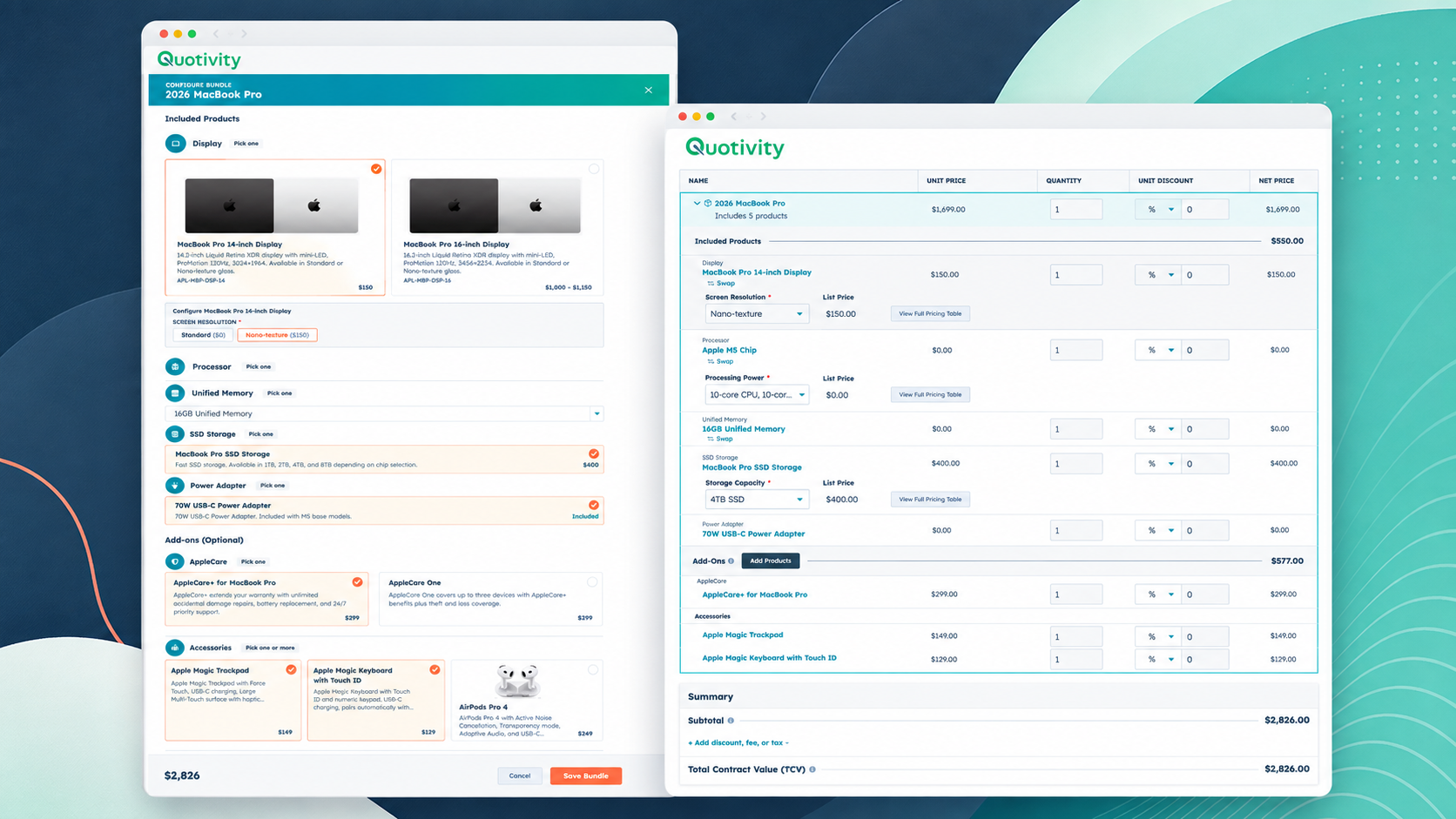
Core Capabilities
Bundles, variants, add-ons, and quantity constraints all live in that one build — not spread across tabs, not living in a rep's head.
Rules Reps Can See, Not Just Trust
Compatibility Rules used to live entirely in the backend. Now they're on screen — pick a base product, and the invalid options simply aren't there to click.
Bundles, Variants, and Add-Ons in One Build
Configure a base unit and everything downstream — add-ons, quantity constraints, variants — updates with it, instead of living in five separate steps.
No Training Doc Required
The configurator is the guide. Reps click through a one-step, graphical build without needing to memorize which parts go together.
Built on What You Already Have
Product Configurator sits on top of your existing Bundles, Compatibility Rules, and product properties. It's a new interface, not a new rules engine.
How It Works
-
Pick a base product. Reps start where every quote starts.
-
See only what fits. Compatibility Rules filter the option list in real time. Invalid combinations are removed before a rep can select them.
-
Add variants, bundles, and constraints. Everything configurable lives inside the same one-screen build.
-
Quote it. What gets sent downstream is already valid. Nobody has to catch a mistake that never happened.
Your reps stop guessing which parts go together.
Configuring a bundle used to mean expanding each component one at a time and hoping the combination was valid. Now it's one screen.
Product Configurator turns Quotivity's Compatibility Rules into something a rep can actually see and click through. Pick the base product, and the add-ons that don't work with it aren't there to pick.

Reps quote with confidence
No more guessing which parts go together — if it's on the screen, it's valid.
Faster configuration, every time
One screen replaces the back-and-forth of checking, unchecking, and re-checking combinations by hand.
Quotes build themselves
Invalid combinations can't make it into a quote in the first place, so there's nothing for approvals to catch and kick back.Frequently Asked Questions About Sales Quotes
Do I need to rebuild my product catalog to use this?
No. Product Configurator sits on top of your existing Bundles, Compatibility Rules, and product properties. It's an interface, not a rebuild.
What happens to combinations that don't fit?
They're not shown. Pick a base product, and only the options that pass your existing Compatibility Rules are available to select.
Does this replace the Rules Engine or Compatibility Rules?
No. Product Configurator is the screen reps use — the rules themselves still live in Configurable Products, same as before.
Do reps need training to use it?
The interface is the training. If an option is on screen, it's valid — there's no separate reference doc to memorize.
Is this available now?
Yes. Product Configurator is live as part of Configurable Products — if you're already on Quotivity, there's no separate rollout to schedule.
What is a revised quote?
A revised quote is an updated version of a sales quote after pricing, products, quantities, terms, or scope changes.
Template Designer helps teams keep revised quotes clean and consistent without rebuilding the template.