Calculated pricing
Calculated pricing in HubSpot, down to a formula per price book
Native calculated pricing runs one formula per product. The moment the right price depends on who you’re selling to, or whether it’s a new deal or a renewal, one formula stops being enough. Quotivity lets the same product carry a different formula in each price book, resolved from the book on the quote.
The short answer
What is calculated pricing in HubSpot-native CPQ?
Calculated pricing sets a product’s price from a formula that reads live deal and line-item data (square footage, volume, seat count, a cost rate) instead of a number typed by hand. Quotivity runs those formulas on HubSpot’s own records. The same product can also carry a different formula in each price book, so the calculation itself changes with the selling context.
What a calculated price can do
Field-driven formulas
A formula pulls live data from the objects a quote already touches, companies, deals, and line items, so the price adapts to your CRM data instead of a number someone typed.
Dynamic pricing
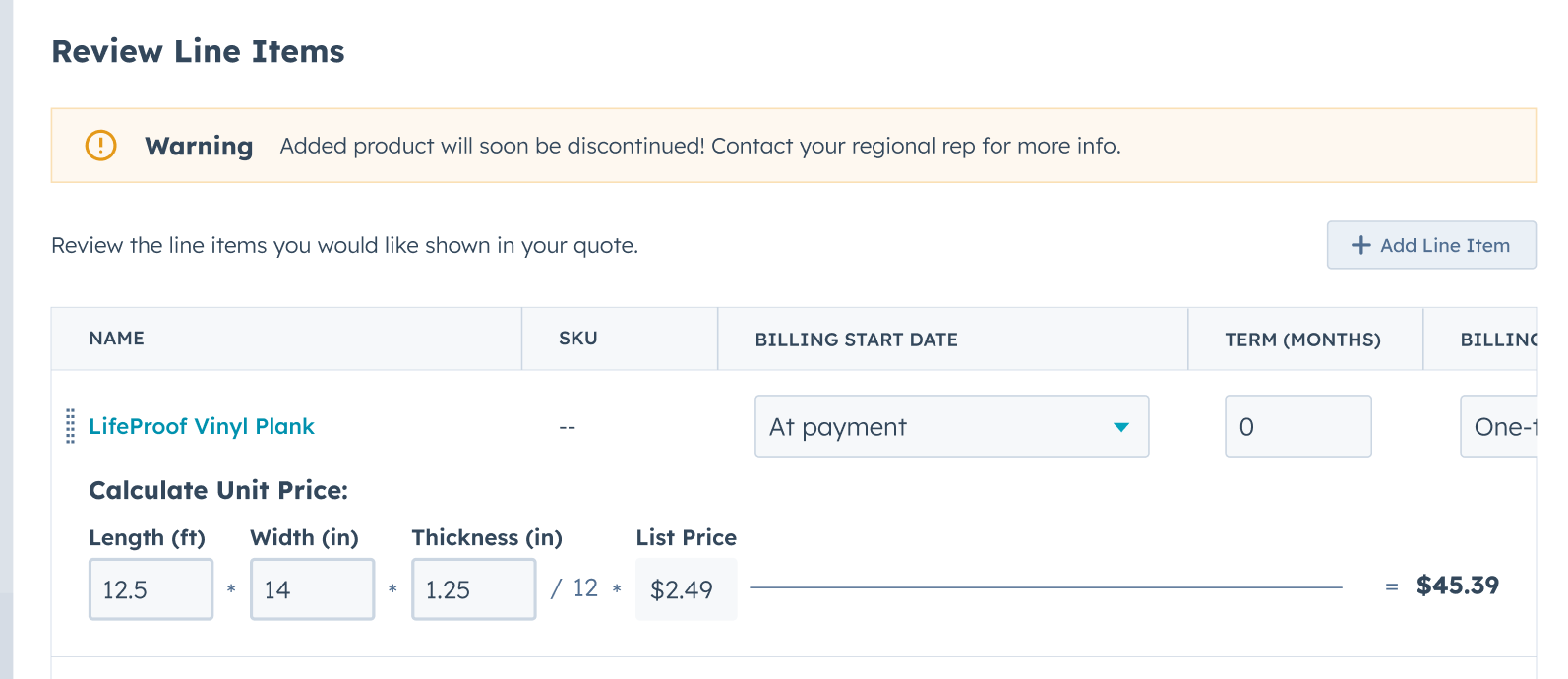
A rep enters the values you define, a quantity, a size, a rate, and the price calculates on the spot from the formula an admin set. The rep supplies the inputs; the system does the arithmetic.
Quote-specific pricing
The awkward requirements get handled in the formula: onboarding at 15% of the software total, a gross-margin floor the quote has to clear, a service priced off headcount.
How calculated pricing works
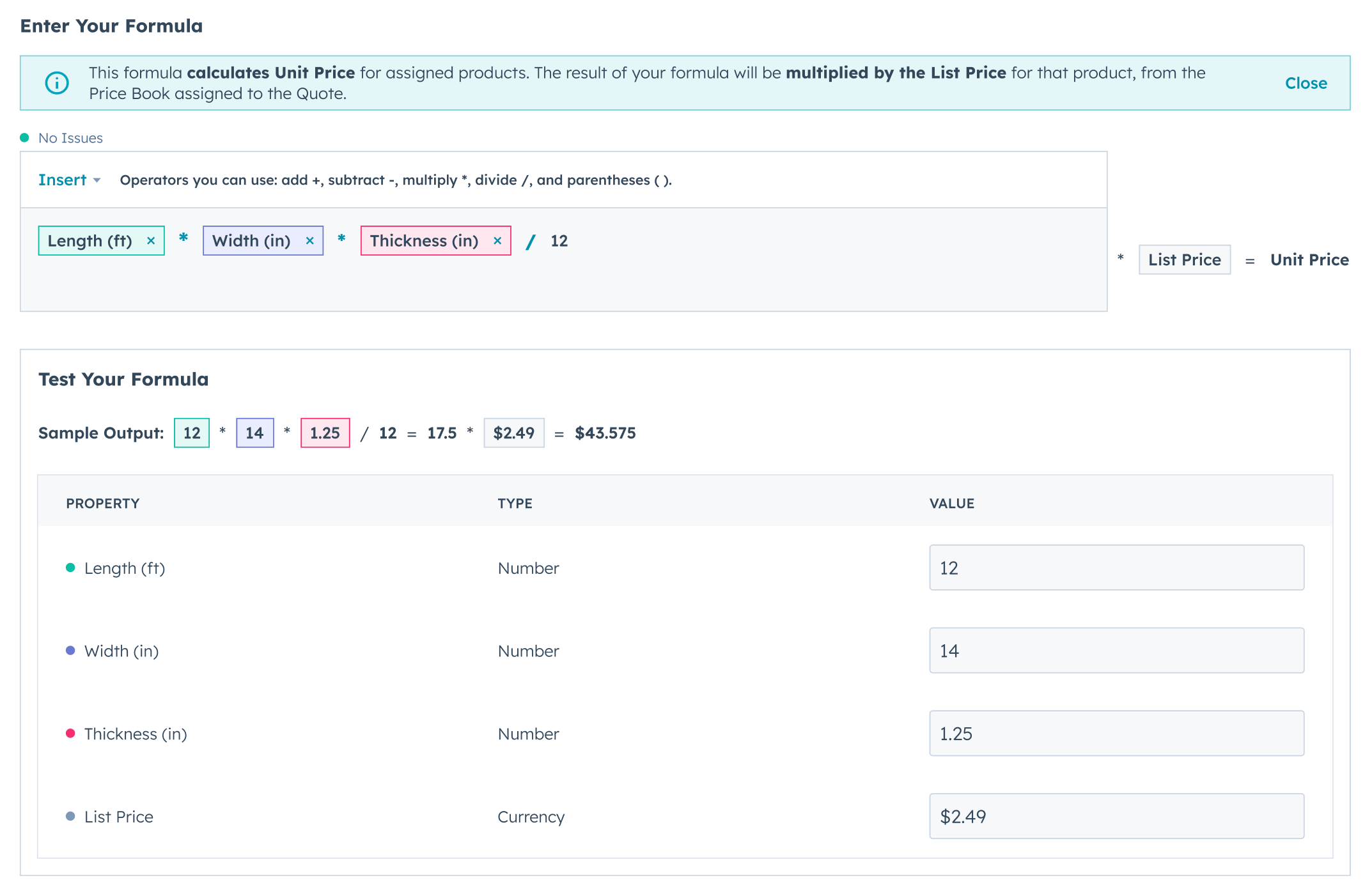
Build the formula
In the Price Builder, pick the products, choose the fields the price depends on, and set the operators. An admin does this once; it’s where the pricing logic lives. Nobody types the price after that.


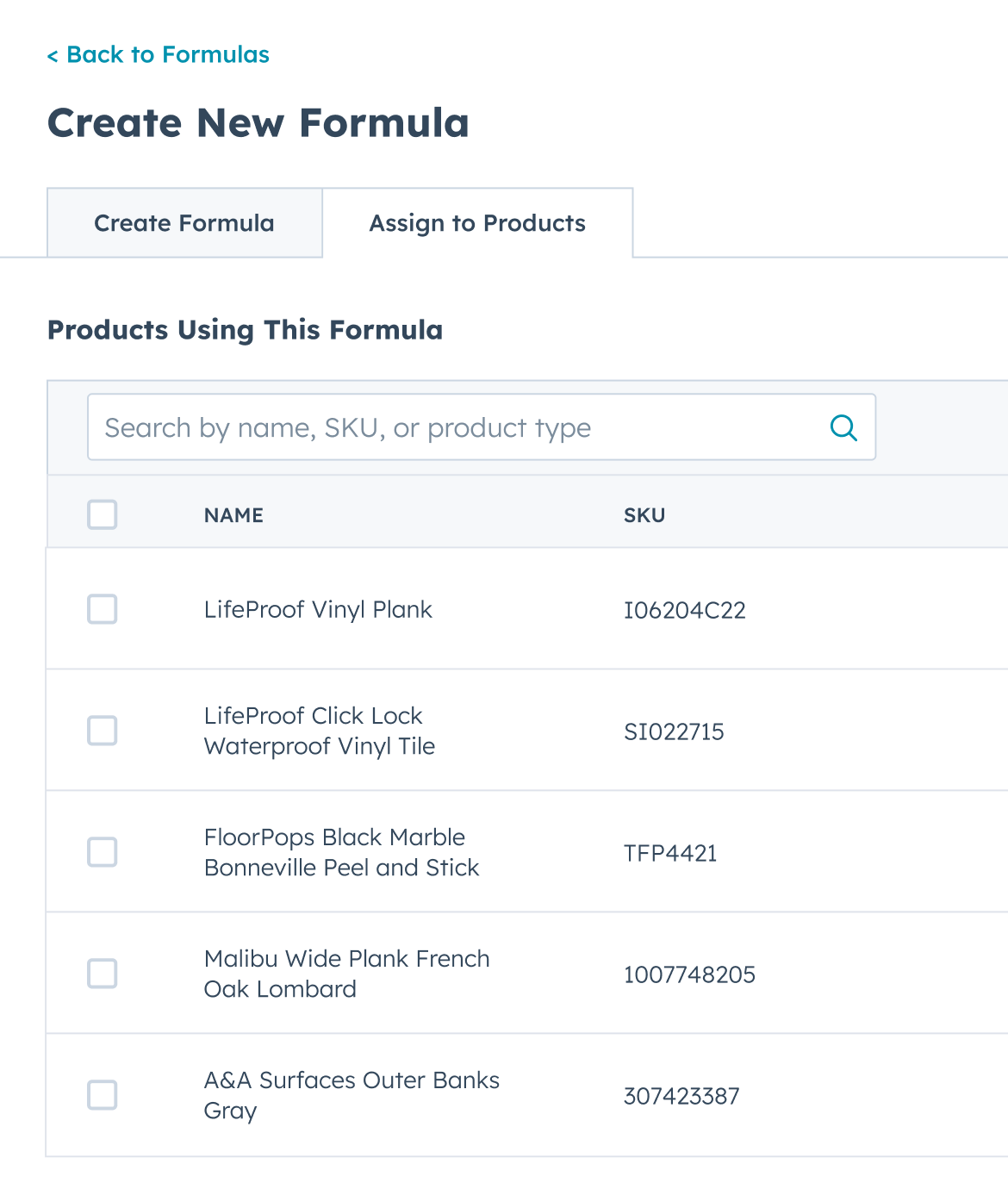
Assign it to products
Attach the calculation to products across your price books, and every quote that includes them prices off the formula from then on, volume and tiered rates included. Change the formula once and every future quote follows.
Watch it resolve on the quote
As a rep configures, pricing tables shift the number to match what they pick, a size, a tier, or a value they enter. When the quote generates, the final price reflects the calculation, every line accounted for.

Where native calculated pricing runs out
Native calculated pricing applies a formula to a product. It’s the same formula everywhere that product is sold. That holds right up until the pricing logic has to change depending on who’s buying or where they are in the relationship. The logic itself, not just the number.
That’s the gap. And it’s not an edge case. It’s the difference between a distributor and a direct customer, or a new logo and a renewal.
A different formula per price book, per product
Quotivity lets an admin open any price book, find a product, and give it a specific calculated price that replaces the product’s default for quotes using that book. The override lives on the price-book entry, not the product record, so the product’s default stays intact for every other book. One catalog, one product, several formulas, each firing in its own context.
Segment pricing
A filtration manufacturer sells the same filter media to direct OEM customers and to value-added resellers. Direct pricing runs a board-footage formula on the internal cost rate. Resellers run a markup over that same cost, structurally similar but numerically different. The admin keeps the direct formula as the product default and assigns the reseller markup as the override on the reseller price book. A quote on the reseller book prices as a reseller; a quote on the direct book prices direct. Nobody maintains a catch-all formula that tries to be both.
Renewal uplift
A SaaS company prices new deals from seat count and tier. Renewals are different math entirely: take the originally contracted price and apply an uplift. So the initial-sale formula stays the product default, and a renewal price book carries the uplift formula as its override. A renewal rep picks the renewal book and the uplift is already in the number. Uplift is the easiest margin in the business to leave on the table, because it depends on someone remembering. This stops depending on memory.
Industries that quote on a formula
Calculated pricing earns its keep wherever the price is a calculation, not a lookup:
- Contractors and construction. Materials like lumber, cement, or paint, priced on quantity, size, and current market rates.
- HR, payroll, and benefits. Per-employee-per-month pricing calculated from a company field or any value in the CRM.
- Event services. Venue and catering priced on real headcounts and event-specific factors.
- Professional services. Rates that vary by scope, hours, or role, resolved on the quote instead of in a side spreadsheet.
- Manufacturing and wholesale. Volume discounts, material costs, and shipping folded in as operational costs move.
- Subscription and SaaS. Tiers, user counts, and add-ons, each quote matched to what the customer actually takes.
- Logistics and transport. Weight, distance, and delivery speed priced per shipment.
- Retail and e-commerce. Bulk-order adjustments, location-based shipping, and cart-total discounts.
You might not need this
A price you look up, the same for everyone who buys it, is the right answer for most catalogs. Calculated pricing is for the ones where the price is a calculation, and the per-book override is for the narrower set where the calculation itself changes by segment or by stage. If your prices are numbers someone can look up, this is capability you’d pay for and never switch on, and we’d rather say so here than on the fourth call. All of it is on the Enterprise plan, so it is not a small thing to buy and not use.
It does
- ✓ Price from live HubSpot deal and line-item data
- ✓ Recalculate when the deal data changes
- ✓ Run a different formula per price book per product, resolved from the book on the quote
It doesn’t
- ✗ Reach inside a dynamically-priced bundle. Overrides apply to standalone products; option products priced within a dynamic bundle are a separate mechanism, and we’ll tell you where that line sits before you turn it on.
- ✗ Come on every plan. Calculated pricing is on the Enterprise plan, all of it, so if you’re on Professional this is a plan conversation, not a config one.
Questions about calculated pricing
-
Can I use a different pricing formula for the same product in different price books?
Yes. That’s the override. You assign a calculated price to a product inside a specific price book, and it replaces that product’s default for any quote using that book. Every other book keeps the default.
-
Does an override change the product record?
No. It lives on the price-book entry. The product’s default calculated price is untouched everywhere else, so nothing you set for one segment leaks into another.
-
How does this handle SaaS renewal pricing?
A renewal price book carries a formula that applies your uplift to the prior contracted price. The renewal rep selects that book and the price comes out already uplifted.
-
What data can a formula read?
Deal and line-item properties on the HubSpot record: quantity, a custom cost field, tier, seat count, dimensions. If it’s on the record, a formula can use it, and it recalculates when that data changes.
-
Is calculated pricing available on every plan?
No. Calculated pricing is on the Enterprise plan, and that is the whole capability, not only the per-price-book override. Price books are on both plans, so a quote on Professional still prices from the right list. What Professional doesn’t reach is the formula behind that price. The numbers are on the pricing page.
Where this connects
Overrides fire when the right price book is on the quote, and price rules are what assign that book automatically. If you’re serving several segments from one catalog, dynamic price books is the other half of this.
One thing to bring
Bring the formula your spreadsheet is running
The one your reps copy quarter to quarter. We’ll show you it resolving on a live quote instead.